CarExpert Social Tile Tool
2026A full pipeline from RSS feed to branded social PNG.

When CarExpert's in-house designer left the business, nobody sat down and formally reassigned their work. It just quietly landed on whoever was nearby.
For the social media team, that meant adding "make the tiles" to a job that was already full. Their process became: visit the site, find the hero image, download it, read the article to understand the content type, open Canva, upload the image, wrestle the headline into a layout, export, repeat. Ten articles a day. Five days a week. Up to twenty minutes each.
That's a lot of time spent by people who are genuinely good at social media, just not at graphic design. And the tiles showed it. Not bad, exactly. But not what a brand like CarExpert should be putting out.
Our marketing director came to me asking if I could help set up some templates for the team.
My first thought was: I can probably do a decent tile layout in HTML and CSS. And if I can render it in a browser, I can convert it to a PNG via a screenshot API. If that worked, the rest should follow: the RSS feed gives me the data, Slack gives the team somewhere to surface the output. The whole pipeline was legible before I'd written a line of code.
Building it with the team
I did the minimum viable version of both the tile and the editor first. Good enough to test the concept, not so much that I'd built in the wrong direction. Then I sat with the social team and watched them use it.
The headline editing came up immediately. The first pass just rendered the article title as-is, but they needed to be able to tweak it for social, trim it down, punch it up. That became editable text in the UI.
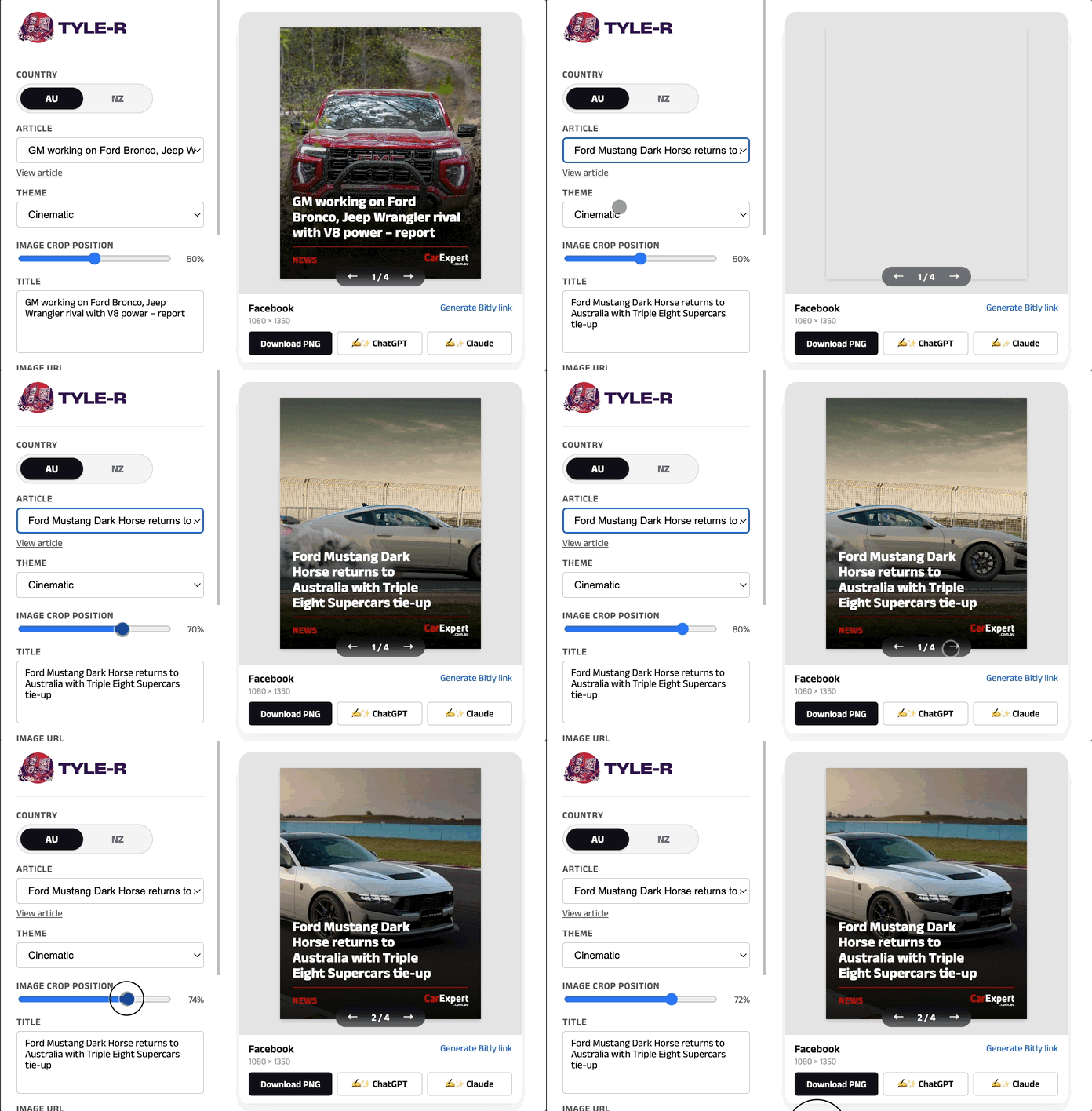
The full-bleed layout was the other big request. The original tile had the image inset with a coloured background. They wanted the image to fill the frame: more impact, more modern. That looked great until the format problem became obvious: CarExpert's article images are always landscape, but Facebook tiles are portrait. Without some control over the crop, you'd routinely end up with a car cut in half or a bonnet filling the frame.
The obvious solution would be AI background extension: generate the missing pixels and fill the portrait frame. It's on the roadmap. But it's expensive at volume and introduces a failure mode where generated content looks wrong in ways that are easy to miss at speed.
The simpler solution works surprisingly well: a slider that maps a 0–100 value to CSS object-position on the background image. The screenshotter captures exactly what CSS renders, so the crop is lossless, non-destructive, and adjustable at any point without touching the source asset. No tokens spent, no generated pixels to sanity-check.
The data model
Each tile is fully described by its URL. Title, image, content type, country, theme, crop position: all query parameters. No database. No sessions. No state to manage.
/templates/facebook.html?title=...&image=...&type=review&theme=cinematic&crop_x=40
This made everything else easy. The Google Apps Script builds a tile URL from a spreadsheet row and hands it directly to a screenshot API. The Slack notification includes an "open in editor" link that deep-links to the exact article, image, and settings. The marketing team can share a link and anyone clicking it sees exactly what they see. The automation, the editor, the screenshot service: everything operates on the same format.
What I built
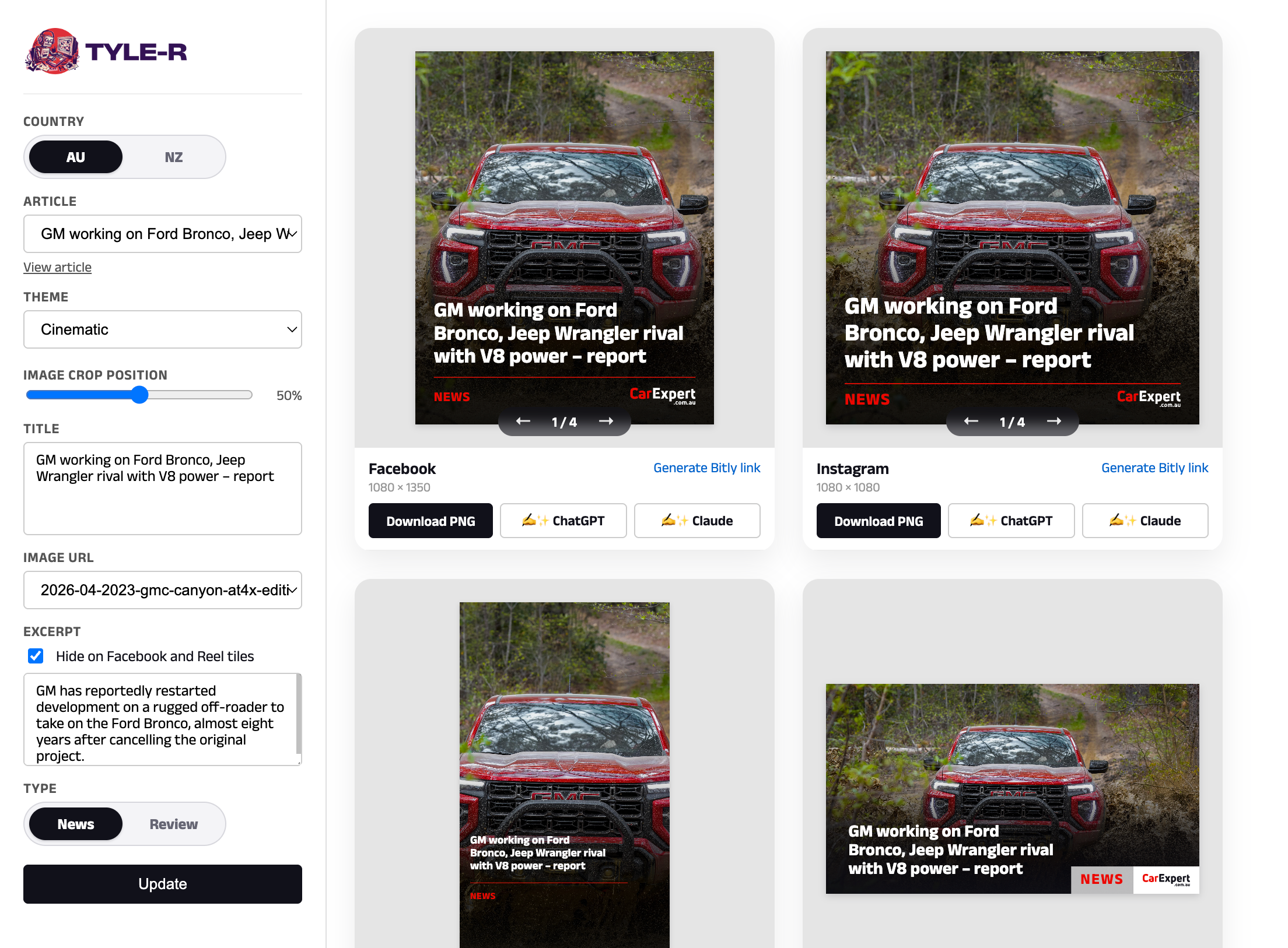
I gave the tool a name, Tyle-R, and a robot avatar to go with it. A small thing, but it gave the Slack notifications some personality and made the tool feel like a colleague rather than a script. The team adopted it immediately.
I handed most of the construction to Claude, describing what I needed, steering the decisions, and letting Claude do the writing. The two-day timeline wouldn't have been possible otherwise.
The frontend is a single HTML page with a sticky sidebar. No framework. Deliberately. The templates are vanilla HTML with CSS classes that a shared JS file populates from URL params at load time.
By the time we'd iterated with the social team, the tool could:
- Pull the latest articles directly from the live RSS feed
- Switch between AU and NZ, with the correct logo and Bitly domain for each
- Choose from multiple images scraped from the article, not just the og:image
- Edit the headline directly for social
- Adjust crop position with a slider, with the image repositioning in real-time
- Switch between visual themes (cinematic full-bleed, inset, full bleed with blurred background)
- Download a pixel-perfect PNG for each platform
- Generate a pre-configured Bitly link with UTM parameters
- Get a social post written by Claude or ChatGPT, in the correct tone of voice for CarExpert
The five templates cover Facebook (1080×1350), Instagram square (1080×1080), Instagram Reel cover (1080×1920), X card (1200×675), and carousel slides, with the carousel handling three completely different layouts (cover, fact card, end card) from a single file.
Handling different headline length
Headline length is unpredictable. A car review might be "2025 Toyota LandCruiser 300 Series GR Sport review", and it needs to fit in the same space as "2026 Kia models" Truncating feels wrong. So the text-fitting function starts at the maximum font size and steps down in 2px increments until the title fits, measuring actual DOM heights at each step. It accounts for bar padding, the divider, footer height, flex gaps, all read from computed styles at runtime.
The team never touches text size manually. Every tile looks intentional regardless of headline length.
The automation layer
A Google Apps Script checks the AU and NZ RSS feeds every 30 minutes during publishing hours. When a new article appears, it:
- Scrapes the hero image from the article page
- Builds a tile URL with the article details
- Calls a screenshot API (with a 5-second delay to ensure images have loaded)
- Saves the PNG to Google Drive
- Posts a Slack notification with the tile image, article details, and links to the article, the spreadsheet row, the editor, and the Drive folder
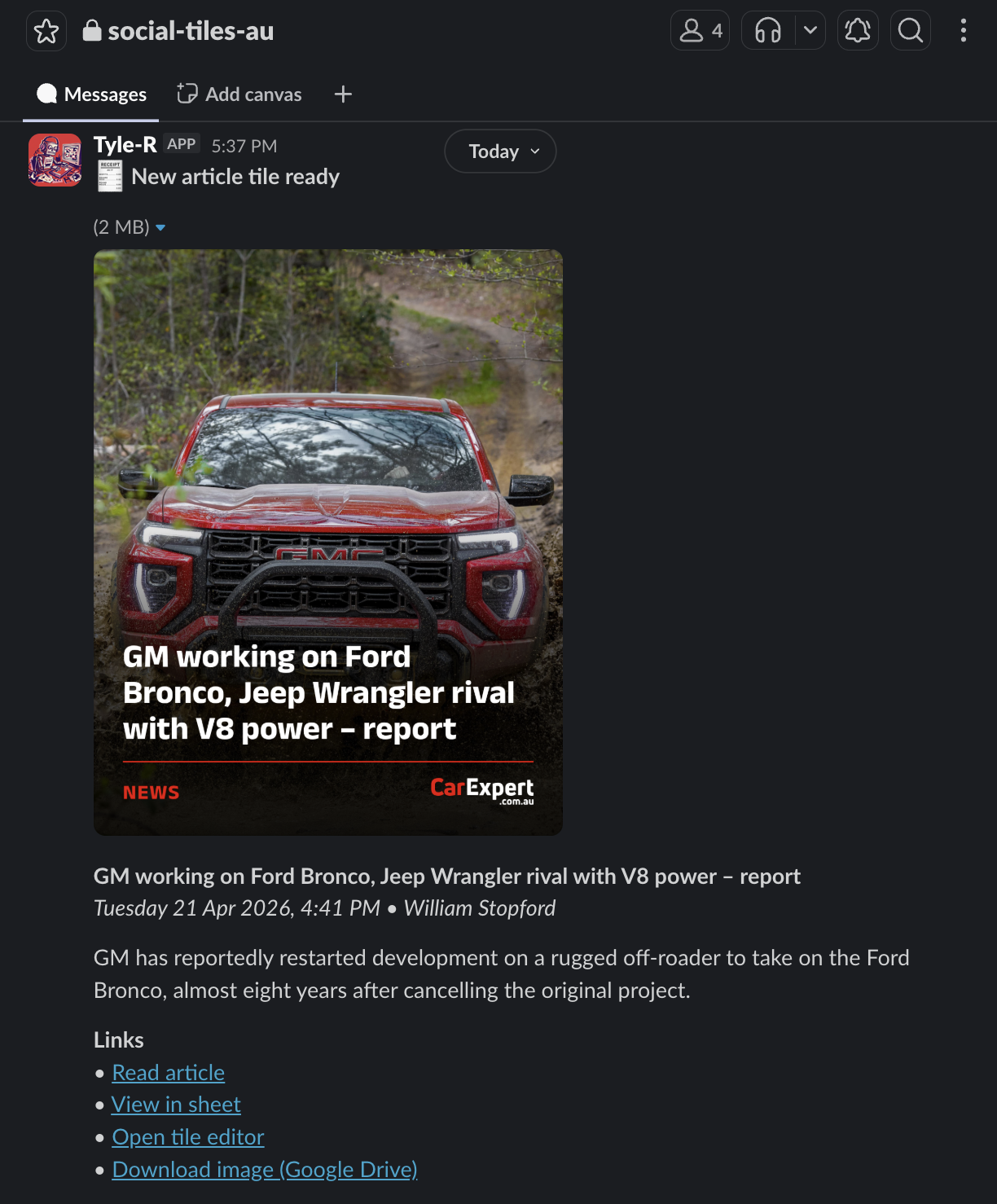
Before this, the social team had to keep an eye on the site themselves to know when new content was live. Now Slack tells them, complete with a ready-to-use tile and a one-click link to open it in the editor if anything needs adjusting. New article, new Slack message, no manual checking required.
The Slack message includes a deep-linked editor URL, so the team can click through and immediately start customising (adjusting the crop, swapping the image, generating Bitly links) from exactly where the automation left off.
The spreadsheet has a status dropdown on each row (Pending, Scheduled, Posted, Skip), so the team has a lightweight queue without needing a separate tool.
What I'd do differently
The screenshot service is the only part of this I don't own. It works well, but any outage or pricing change is outside my control. The right long-term move is probably Puppeteer running on the same serverless infrastructure as everything else, but for a two-day build it wasn't the right call.
The Google Sheet as a config store (for AI prompt templates and UTM source overrides) was a pragmatic choice that's worked well. Non-technical team members can tweak the AI post content prompts or UTM properties without touching code. It's not elegant infrastructure, but it's the right trade-off for the audience.
Outcome
The social team went from spending up to 20 minutes per article (10 articles a day, five days a week) to having on-brand tiles generated automatically and waiting in Slack. They're notified when content goes live, handed a finished tile, and only need to open the editor when something genuinely needs a human eye on it.
The automation does the predictable work. The team does the judgment work.
That's the version of this I was hoping for when our marketing director asked for templates and mentioned she'd love to automate it eventually. It just happened to take 48 hours instead of months.