CarExpert Daily Digest
A Slack message at 7am every day with CarExpert’s new articles and videos, their pageviews and comments, and a short AI-written note on what’s performing.
- Role
- Designer & Developer
- Client
- CarExpert
- Year
- 2026
- With
- n8n, Docker, Ollama, Gemma, GA4 Data API, Disqus API, Slack Block Kit
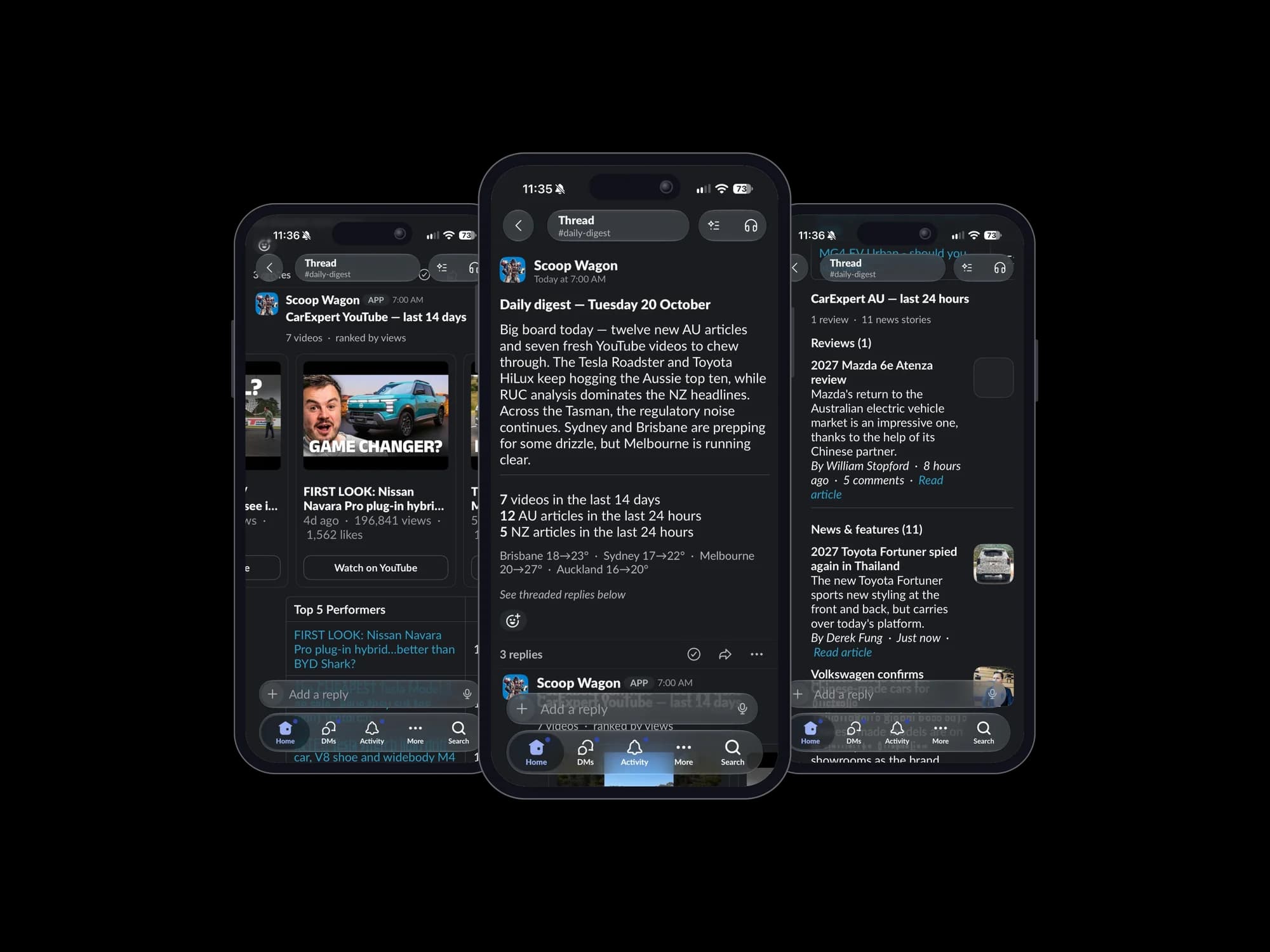
Everything that tells you how CarExpert’s content is doing lives somewhere different. The articles are on the AU and NZ sites. Pageviews are in GA4. Comments are in Disqus. Videos are on YouTube. Checking all four every morning means four logins and some mental arithmetic.
The Daily Digest does the checking. At 7am Brisbane time, it posts one message to Slack covering the last day’s articles and videos, how they’re performing, and a short note on what stands out. I designed and built it in May 2026.
Who reads it
Three teams use it, and each wants something different:
- Marketplace use it as a daily check-in on new articles and videos, so they can mention them when they’re on the phone to customers.
- Marketing use it to see what’s trending and pick content worth extra promotion.
- Editorial get a quick view of what went out yesterday and how it’s doing.
It was also a chance to try three things I’d been curious about: n8n, Slack’s richer message layouts, and running an AI model on my own machine.
One message, three threads
A daily report posted straight into a channel soon becomes the thing everyone scrolls past. So the digest is one short parent message, with the detail in three threaded replies.
The parent message has the date, an intro of under 80 words, counts of new videos and AU and NZ articles, and a one-line weather strip for Brisbane, Sydney, Melbourne and Auckland. Those are the cities CarExpert has offices in, so the weather is mostly there for fun: everyone can see what it’s like where their colleagues are.
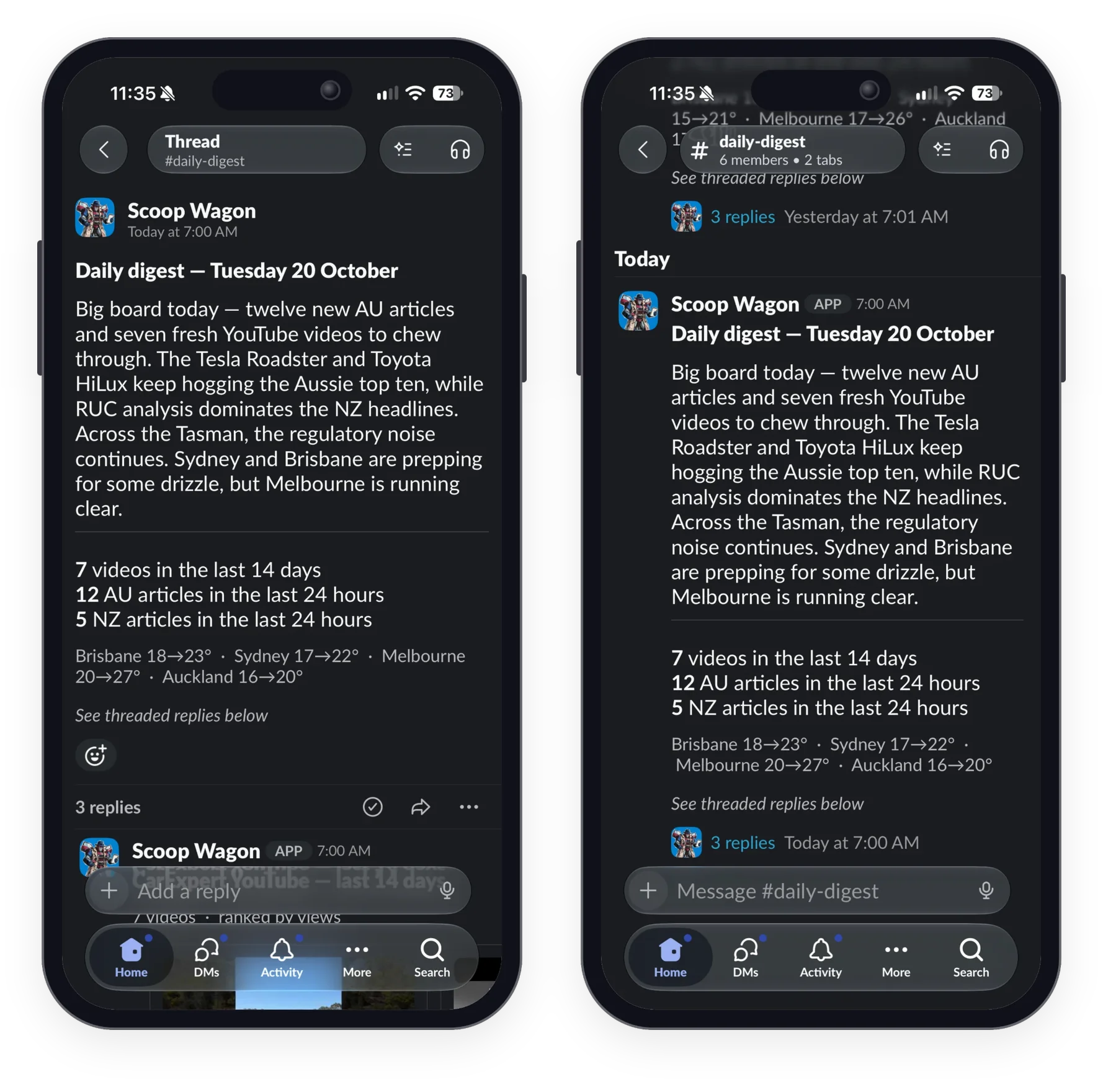
The replies hold the rest:
- YouTube: a swipeable carousel of up to 10 videos from the last fortnight with views and likes, and a top five table ranked by views, views per day and like rate.
- Australia: every article from the last 24 hours, split into reviews and news, each with its summary, author, age, GA4 views, comment count and image. Below that, the 10 most-read articles of the past week.
- New Zealand: the same layout for carexpert.co.nz.
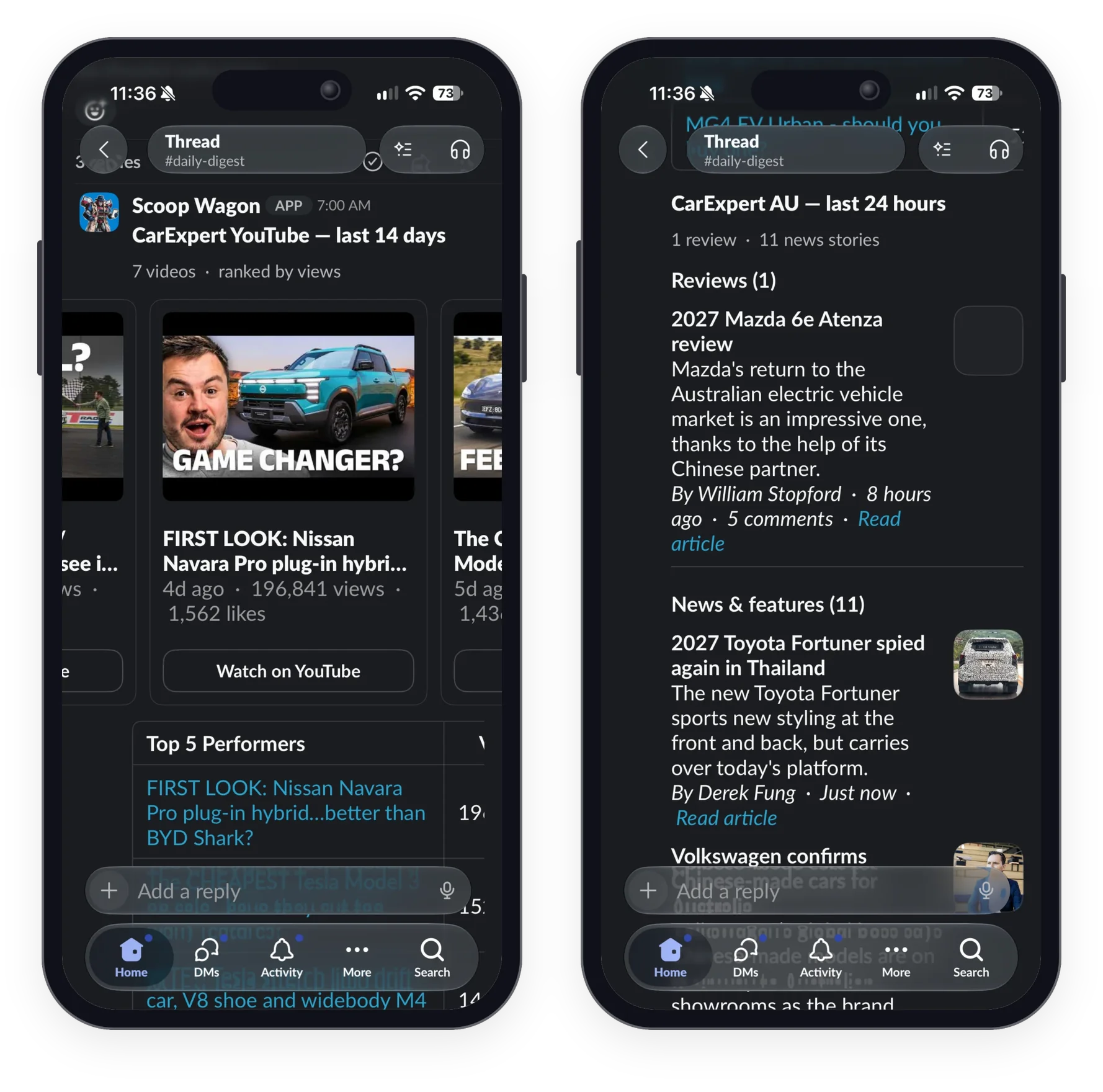
If you just want the headline, you read the parent message and move on. If you want the detail, you open the thread.
Giving the AI a memory
The intro is the part that reads like an editor wrote it, and that comes down to memory.
Each day, the workflow stores that day’s top 10 articles and keeps the last 30 days of them. Before the intro is written, it compares today’s list with that history and works out which articles are new entries, which have moved up or down, and which have stayed in the top 10 for several days running. The AI gets those patterns and is asked to comment on them, rather than read out the numbers. On 20 October, for example, it opened by noting that the Tesla Roadster and Toyota HiLux “keep hogging the Aussie top ten”.
With only today’s figures, the AI could say which article had the most views. With a month of history, it can say a review has held the top spot all week, or that a news story has already dropped out. That’s the comparison someone would otherwise make by hand, flicking between a week of reports.
How it works
At 7am the workflow starts three branches at once, one each for YouTube, Australia and New Zealand. The AU and NZ branches read the RSS feeds, then look up each article’s pageviews in GA4 and its comment count in Disqus. The branches merge, today’s top 10 is compared with the stored history, and the AI writes the intro.

The parent message is posted first, so the three replies have something to attach to.
The whole digest is a single n8n workflow of 29 steps. I built it over four days, 11–14 May 2026, and saved 446 revisions of it along the way.
What it runs on
None of it is a paid service:
- n8n, self-hosted in Docker on a Mac mini, runs the workflow.
- RSS feeds supply the AU and NZ articles and images, and the YouTube channel’s feed supplies videos, views and likes without needing a YouTube API key.
- The GA4 Data API and the Disqus API add pageviews and comment counts.
- Open-Meteo provides the weather.
- Gemma, running locally through Ollama, writes the intro.
- A Slack bot posts it all, using Block Kit carousels and tables.
The only running cost is the electricity for the Mac mini.
What I learned
The public feeds went further than I expected. They cover articles, images and video stats, so only GA4 and Disqus needed API access at all.
The memory made more difference to the AI than the model did. A small local model given one day’s list can only summarise it. Given 30 days of rankings, it picks out streaks and movement that are worth reading.
There are limits too. It runs on one personal machine, so if the Mac mini is off, the digest doesn’t post, although a failure does send me an alert on Telegram. The intro comes from a small model, so it still needs a person to spot-check that it describes the numbers correctly. And YouTube’s channel feed may only list the most recent 15 uploads, which would cut a busy fortnight short. I still need to check that.
What’s next
The next step is to move it off my Mac mini and onto company-owned hosting and accounts, before more teams start relying on it.
After that, the pattern is easy to reuse. Weekly versions already exist as separate workflows, including one for marketing that reads from a Google Sheet. Digests for a single team, per brand for editorial or per dealer group for sales, mostly need different filters and a different prompt. And tracking reactions and replies in Slack would show which parts people use.